No track needed
AI music video generator: your song, your faces
Bring one photo of yourself and one of a friend. The generator writes the verses, builds the beat, voices two rappers and puts the pair of you on stage delivering every line.
This AI music video generator starts where most others stop: you have no song yet. Add a photo of you and one of a friend, type a topic, and it writes and produces a rap song, then shows the two of you performing it on stage. Already holding a finished track? An audio-first tool, compared below, suits you better.
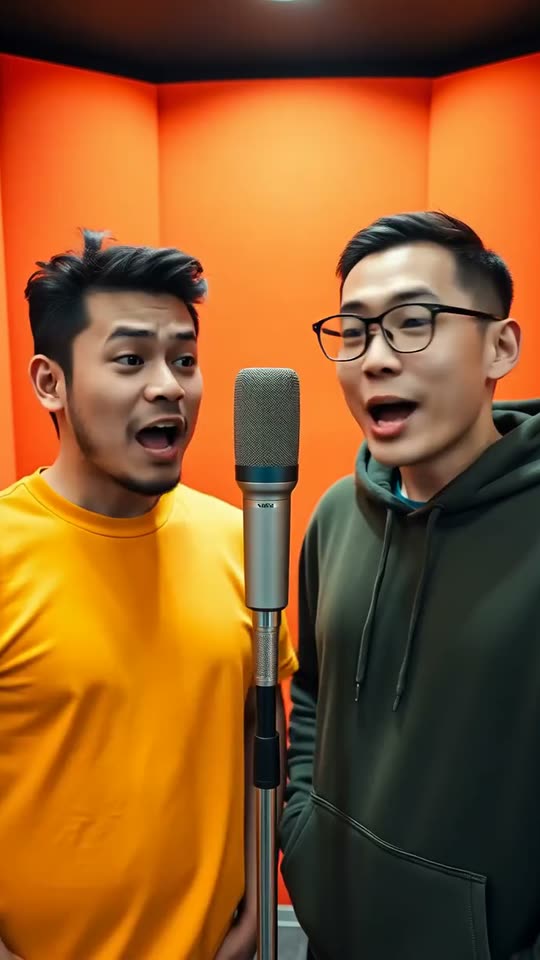
An original song for every video: no borrowed hit, no cloned voice, and a failed render is never charged.
Music videos made from two photos
Two friends, one track A couple, from one photo Grandpas on the mic A birthday roast


No song needed: how this generator differs
Type "AI music video generator" into a search bar and nearly every result assumes the same thing: the music exists and only the pictures are missing. You upload an MP3, pick a visual style, and the software paints shapes, scenes or lyrics that move with the beat. That works well for a band with a release date. It does nothing for two friends who want to star in a song that has not been written.
This generator reverses the order. The chain runs photos and topic, then song, then video. From your topic it drafts the lyrics, composes an instrumental and produces two rapping voices. From your photos it builds two performers who look like you and your partner, stands them in a booth and moves their mouths to the vocals, syllable by syllable. Music and picture leave the same job together, so nothing has to be lined up by hand afterwards.
The trade-off is honest: there is no audio upload, and the song is always a short duo rap. If you want a ballad set to drifting landscapes, or visuals for a track you already mixed, read the comparison further down and pick a tool built for that. If you want to see yourself and a friend in a music video with a song nobody else has, keep reading.
How to turn two photos into a music video
- Choose one clear photo of each performer, face toward the camera and evenly lit. They can be from different days; one picture showing both faces works too.
- Tick the consent box to confirm both people agreed to appear. Photos of anyone who looks under 18 are refused.
- Pick a stage: the orange Tangerine Booth is selected for you, with Marble Hall, Neon Studio and Midnight Block as the alternatives.
- Type a topic, such as a promotion, a trip or a running joke, and set the length anywhere from 5 to 15 seconds. The cost in credits shows before you confirm.
- Start the render, watch the preview, then unlock the full video and save the MP4 to your phone or computer.
Music video ideas that work
- A friendship anthem: a decade of shared jokes squeezed into one chorus for the group chat.
- A birthday opener: the person celebrating and their favourite human rapping about the big day.
- An anniversary duet: a couple trading lines about the night they met, played over dessert.
- A team hype clip: two colleagues marking a launch, a record month or the start of the holidays.
- A family throwback: siblings, or a parent and a grown-up kid, rapping the old house rules.
- A farewell single: flatmates or coworkers saying goodbye with a verse instead of a card.
- A trend remake: the orange-booth look everyone recognises, starring you instead of the originals.
This generator or an audio-first tool?
Both kinds of software are sold under the same label, yet they solve opposite problems. The quickest way to choose is to start from what you already have in hand.
| What you have | The better fit |
|---|---|
| No song, and two people who want to star in one | This generator: lyrics, vocals and video in one render |
| A finished track that needs visuals or a lyric video | An audio-first tool that accepts an upload |
| Only an idea for lyrics you will perform yourself | A lyrics writer, or the AI rap generator when you would rather have it performed for you |
| A wish for abstract visuals with no faces at all | A text-to-video or animation tool |
Three audio-first tools, described by what their makers publish about them (read on the vendors' own pages, as of October 1, 2026; check the linked page before paying, since plans change often):
| Tool | You give it | Writes the music? |
|---|---|---|
| Neural Frames | Your finished track plus text prompts | No, it animates your audio |
| Freebeat | Your track, or a link to it | Yes, it also offers music models |
| Kaiber | Your track, reference images and a style | Short sound clips, not full songs |
Prices, free tiers and watermarks for these and more sit in our guide to the best AI music video generators, which also says plainly where each one beats us.
What one render gives you
- A new song. Lyrics and beat written for your topic, so no two videos share a track.
- Two generated voices. They belong to your duo and imitate no real artist.
- Lip-sync that holds. Mouths follow the vocals because sound and picture are made in one pass.
- A phone-shaped file. Every song is a 720p vertical MP4 (9:16), 5 to 15 seconds long; the standard song is Standard, 720p, 12 seconds.
- A clean download. The unlocked video carries no watermark and is labelled as AI-made, as our terms require.
The look of the default stage comes from the Hotel Lobby AI trend, so a clip made here sits comfortably next to the versions already circulating.
Care more about the words than the pictures? The AI rap generator page starts from the topic, while the AI rapper page is about seeing yourself on the mic. The birthday rap song maker and the AI rap battle generator point the same studio at a party or a friendly feud. If the orange booth is what brought you here, our Hotel Lobby trend walkthrough sets the editing-app route beside the two-photo one, and the pricing page lists every plan and pack.
FAQ
Questions about the music video generator
Can I upload a song I already made?
No. The music is created in the same render as the picture, which is what keeps the mouths in time with the words. For visuals over a finished track, use an audio-first tool; our guide to AI music video generators compares several.
Is there a free AI music video generator here?
One free preview per person, where offered, for Google or GitHub sign-ins. A full video uses 10 credits: one song is $7.99, the 5-song Duo pack is $29 and the 4-song monthly plan is $19.90. A render that fails is never charged, and pack credits never expire.
How long can the music video be?
Anywhere from 5 to 15 seconds; you set the length before you start. The standard song is 12 seconds. Making it takes a few minutes, and the page tells you when it is done.
Which format and resolution will I get?
An MP4 in 720p, vertical (9:16), the shape TikTok, Reels and Shorts expect. Every song is made in this one format, so there is no resolution or aspect setting to choose.
Who owns the music video?
Once it is unlocked you may download it and share it for any lawful purpose that respects our terms. It is AI-generated and labelled so, it must not be passed off as real footage, and similar topics can lead to similar results for other users.
Can I post it on YouTube or TikTok?
Yes. The unlocked file has no watermark and fits vertical feeds as it is. The song is written for your video rather than taken from a record, so there is no copyrighted track to get the post muted.
Does it work for a solo artist?
No. Every song is written for two rappers trading lines, so the studio needs two faces. Bring a friend, partner or sibling who agrees to appear, or use one photo that shows you both.
Your first music video, no song required
Two photos and a topic go in; a music video starring both of you comes out.