How to make a rap duo video: three ways, step by step
By the Rap Duo Video team
To make a rap duo video you need a clear photo of each person and one tool. The most direct route is a rap duo video maker: add both photos, pick a stage and a topic, and it writes the song and animates you both. Templates and prompt tools work too, with trade-offs compared below.
What a rap duo video is
A rap duo video is a short vertical clip in which two people trade lines over a beat, as if they shared a booth. The format took off in September 2026 with the Hotel Lobby AI trend, which borrows the orange room of Quavo and Takeoff's 2022 session, and it is often searched as Migos AI. Anyone can make one now without filming a frame.
What you need before you start
- One photo of each person, facing the camera, or one photo with both of you in it.
- Their agreement: you are putting their face in a video.
- A topic, if you want lyrics about something specific: a birthday, a team win, an inside joke. Need a name for your duo? Try the rap duo name generator.
- A phone or laptop with a browser; there is no app to install.
Way 1: two photos in a rap duo video maker
This is the route our studio takes, and the only one of the three that makes the music for you. The steps:
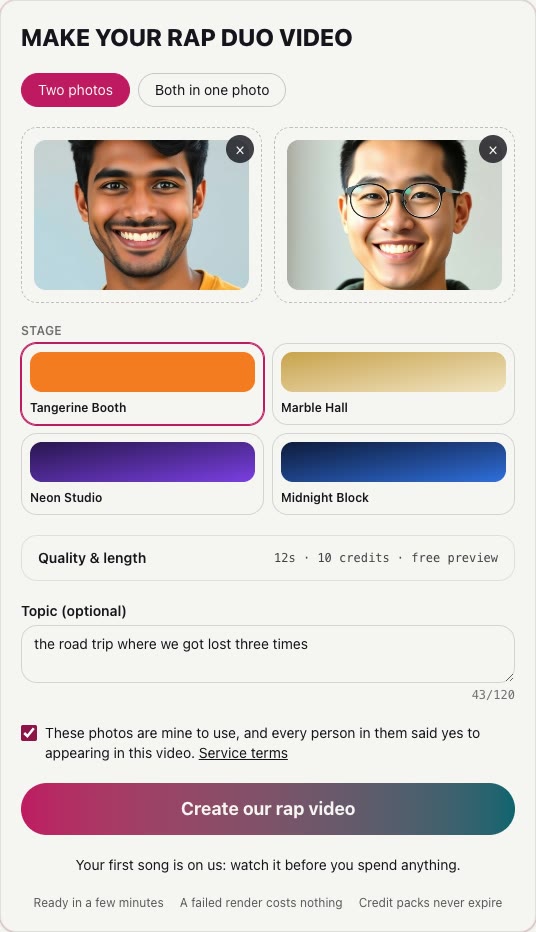
- Pick two clear photos. Use one front-facing photo of each person, in good light, with no sunglasses, masks or heavy filters. A single photo with both of you in it works too.
- Add them to the studio. Open the studio, choose Two photos or Both in one photo, and drop the pictures into the slots. Every face is checked, and photos of anyone who looks under 18 are refused.
- Choose a stage. The Tangerine Booth is the orange look of the Hotel Lobby trend. Marble Hall, Neon Studio and Midnight Block give the same song a different room.
- Say what the song is about. Type a topic of up to 120 characters: a name, a place and one odd detail work best. Leave it empty and the duo raps about itself.
- Tick the consent box and start. Confirm the photos are yours to use and that both people agreed, then start the render. The lyrics, beat and two voices are written first, then both faces are animated singing them.
- Watch, unlock and share. The finished clip arrives as a vertical HD video (12 seconds by default). Unlock the full version without a watermark and post it wherever you like.
The longer walkthrough with a screenshot per step is in how to make an AI rap video.
Way 2: a face-swap template in an editing app
Video editors such as CapCut host community templates built on the original Hotel Lobby clip: you pick the template, add your face, and export. It costs nothing in most cases, but you keep the original recording, which is the track most likely to be muted on a short-video feed, and many templates swap one face at a time. Our Hotel Lobby trend guide walks through that free route.
Way 3: a prompt-based AI video tool
General video generators turn a text prompt and a reference image into a clip. They need your own audio for the rap, and keeping two specific faces apart and in sync over a whole verse takes careful prompting and several tries. They suit people who already have a song and want full control of the shot.
The three ways side by side
| Route | Cost | Needs a video? | Original song? | Mute risk | Two distinct faces? |
|---|---|---|---|---|---|
| Two photos in a rap duo video maker (this studio) | 10 credits a song; one song on its own is $7.99 | No, two photos | Yes, written for you | Low: the music is new | Yes, one per side |
| A face-swap template in an editing app | Usually free in the app | Often a selfie video | No, the original track | Higher: a known recording | Often one face at a time |
| A prompt-based AI video tool | The tool's own credits | No, a prompt and images | No, you bring the audio | Depends on your audio | Varies; faces can drift |
General traits of each route as of October 1, 2026; individual templates and tools differ, so check the one you pick. Our prices are on the pricing page.
Photo tips that make the result better
- Shoot or pick photos at eye level, face filling about a third of the frame.
- Even, soft light; no strong shadow across half the face.
- Real people only: drawings, mascots, statues and costumes are refused.
- Different days and places are fine; the stage puts you side by side.
- For a couple or siblings in one picture, use the Both in one photo mode rather than cropping one shot in two.
Before you post
Ask the other person before you share their face, keep roasts kind, and do not use anyone famous: the studio refuses public figures' songs and voices, and so do most platforms. Because the song is written for you, it does not carry someone else's recording. For occasion ideas see the birthday rap song page, or send the video as a gift link to a whole group.